














Netflix
How to trade your Netflix gift card?
Killing your Netflix gift card is very easy. In this article we explain to you step by step how to do and what to do if some error appears to you during the process.
Steps to trade your card
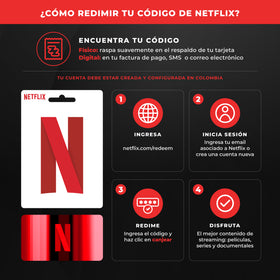
Enter netflix.com / redee m.
Copy and stick your gift card code to the appropriate field.
Click "Chilling".
If you have an active account, Netflix will ask you login or create a new account.
Once the code has been exchanged, the balance will be added to your account automatically.
Netflix will automatically compute the duration of the subscription using the value of the card.
Possible problems with changing your card
Invalid code
That message may appear for two reasons:
Wrong region: The code belongs to another region other than Colombia.
) Resolution: activates a VPN set up in Colombia and conduct an exchange directly from there.It has a balance from another country: if your account already had a different region balance (for example, Mexico, Argentina, Spain or Venezuela), Netflix does not allow to combine balances from different countries.
) Resolution: create a new account and conduct an exchange into that account.
Code already exchanged
Sometimes the system can process the code without showing confirmation (for example, if the page remains loaded).
Retirement:
Check first if the balance has been applied to your account.
If she doesn't show up, Communicate with Netflix support To confirm code status.
If Netflix confirms that the code was already used, write to us at Support chat (bottom right) and send us:
Capture of the chat with Netflix where the email and user profile are seen.
Capture of error message while trying to redeem.
That information will allow us to check the case and to figure out if a refund or replacement of the code corresponds.
Still have problems?
Can you contact us? support equipment by WhatsApp and attached the capture of the error message and chat with Netflix. Our team will help you figure it out as soon as we can.
